# Render Visio documents as HTML, PDF, and image files
Convert Visio diagrams to HTML, PDF, PNG, or JPEG using GroupDocs.Viewer for Python via .NET API.
[GroupDocs.Viewer for Python via .Net](https://products.groupdocs.com/viewer/python-net) allows you to render your Visio diagrams in HTML, PDF, PNG, and JPEG formats. You do not need to use Microsoft Visio or other diagramming software to load and view Visio files within your .Net application (web or desktop).
To start using the GroupDocs.Viewer API, create a [Viewer](https://reference.groupdocs.com/viewer/python-net/groupdocs.viewer/viewer) class instance. Pass a document you want to view to the class constructor. You can load the document from a file or stream. Call one of the [Viewer.view](https://reference.groupdocs.com/viewer/python-net/groupdocs.viewer/viewer/#methods) method overloads to convert the document to HTML, PDF, or image format. These methods allow you to render the entire document or specific pages.
{{< button style="primary" link="https://products.groupdocs.app/viewer/visio" >}} {{< icon "gdoc_person" >}} View Visio files online {{< /button >}} {{< button style="primary" link="https://github.com/groupdocs-viewer/GroupDocs.Viewer-for-Python-via-.Net" >}} {{< icon "gdoc_github" >}} View demos and examples on GitHub {{< /button >}}
## Supported Visio file formats
GroupDocs.Viewer supports the following Visio file formats:
* [Visio Drawing](https://docs.fileformat.com/visio/vsdx/) (.VSDX)
* [Visio 2003-2010 Drawing](https://docs.fileformat.com/visio/vsd/) (.VSD)
* [Visio Macro-Enabled Drawing](https://docs.fileformat.com/visio/vsdm/) (.VSDM)
* [Visio Stencil](https://docs.fileformat.com/visio/vssx/) (.VSSX)
* [Visio 2003-2010 Stencil](https://docs.fileformat.com/visio/vss/) (.VSS)
* [Visio Macro-Enabled Stencil](https://docs.fileformat.com/visio/vssm/) (.VSSM)
* [Visio Template](https://docs.fileformat.com/visio/vstx/) (.VSTX)
* [Visio 2003-2010 Template](https://docs.fileformat.com/visio/vst/) (.VST)
* [Visio Macro-Enabled Template](https://docs.fileformat.com/visio/vstm/) (.VSTM)
* [Visio Drawing XML File](https://docs.fileformat.com/visio/vdx/) (.VDX)
* [Visio Stencil XML File](https://docs.fileformat.com/visio/vsx/) (.VSX)
* [Visio Template XML File](https://docs.fileformat.com/visio/vtx/) (.VTX)
* [Visio Web Drawing](https://docs.fileformat.com/visio/vdw/) (.VDW)
GroupDocs.Viewer can detect the document format automatically based on information in the file header.
## Render Visio files as HTML
Create an [HtmlViewOptions](https://reference.groupdocs.com/viewer/python-net/groupdocs.viewer.options/htmlviewoptions) class instance and pass it to the [Viewer.view](https://reference.groupdocs.com/viewer/python-net/groupdocs.viewer/viewer/#methods) method to convert a Visio file to HTML. The `HtmlViewOptions` class properties allow you to control the conversion process. For instance, you can embed all external resources in the generated HTML file, minify the output file, and optimize it for printing. Refer to the following documentation section for details: [Rendering to HTML]({{< ref "viewer/python-net/developer-guide/rendering-documents/rendering-to-html/_index.md" >}}).
### Create an HTML file with embedded resources
To save all elements of an HTML page (including text, graphics, and stylesheets) into a single file, call the [HtmlViewOptions.for_embedded_resources](https://reference.groupdocs.com/viewer/python-net/groupdocs.viewer.options/htmlviewoptions/#methods) method and specify the output file name.
{{< tabs "example1">}}
{{< tab "Python" >}}
```python
from groupdocs.viewer import Viewer
from groupdocs.viewer.options import HtmlViewOptions
def render_visio_to_html():
# Load Visio document
with Viewer("sample.vsdx") as viewer:
# Create an HTML file for each drawing page.
# {0} is replaced with the current page number in the file name.
viewOptions = HtmlViewOptions.for_embedded_resources("render_visio_to_html/pdf_page_{0}.html")
viewer.view(viewOptions)
if __name__ == "__main__":
render_visio_to_html()
```
{{< /tab >}}
{{< tab "sample.vsdx" >}}
{{< tab-text >}}
`sample.vsdx` is the sample file used in this example. Click [here](https://docs.groupdocs.com/viewer/python-net/_sample_files/rendering-basics/render-visio-documents/sample.vsdx) to download it.
{{< /tab-text >}}
{{< /tab >}}
{{< tab "render-visio-to-html-outputs.zip" >}}
```text
render_visio_to_html/pdf_page_1.html (6 KB)
render_visio_to_html/pdf_page_2.html (11 KB)
render_visio_to_html/pdf_page_3.html (9 KB)
```
[Download full output](https://docs.groupdocs.com/viewer/python-net/_output_files/rendering-basics/render-visio-documents/render_visio_to_html/render-visio-to-html-outputs.zip)
{{< /tab >}}
{{< /tabs >}}
### Create an HTML file with external resources
If you want to store an HTML file and additional resource files (such as fonts, images, and stylesheets) separately, call the [HtmlViewOptions.for_external_resources](https://reference.groupdocs.com/viewer/python-net/groupdocs.viewer.options/htmlviewoptions/#methods) method and pass the following parameters:
* The output file path format
* The path format for the folder with external resources
* The resource URL format
{{< tabs "example2">}}
{{< tab "Python" >}}
```python
from groupdocs.viewer import Viewer
from groupdocs.viewer.options import HtmlViewOptions
def render_visio_to_html_external():
# Load Visio document
with Viewer("sample.vsdx") as viewer:
# Create an HTML file for each drawing page.
# Specify the HTML file names and location of external resources.
# {0} and {1} are replaced with the current page number and resource name, respectively.
# The resource URL is relative to the HTML file.
viewOptions = HtmlViewOptions.for_external_resources(
"render_visio_to_html_external/pdf_page_{0}.html", "render_visio_to_html_external/pdf_page_{0}/resource_{0}_{1}", "pdf_page_{0}/resource_{0}_{1}")
viewer.view(viewOptions)
if __name__ == "__main__":
render_visio_to_html_external()
```
{{< /tab >}}
{{< tab "sample.vsdx" >}}
{{< tab-text >}}
`sample.vsdx` is the sample file used in this example. Click [here](https://docs.groupdocs.com/viewer/python-net/_sample_files/rendering-basics/render-visio-documents/sample.vsdx) to download it.
{{< /tab-text >}}
{{< /tab >}}
{{< tab "render-visio-to-html-external-outputs.zip" >}}
```text
render_visio_to_html_external/pdf_page_1.html (279 bytes)
render_visio_to_html_external/pdf_page_1/resource_1_g.svg (6 KB)
render_visio_to_html_external/pdf_page_2.html (279 bytes)
render_visio_to_html_external/pdf_page_2/resource_2_g.svg (11 KB)
render_visio_to_html_external/pdf_page_3.html (279 bytes)
render_visio_to_html_external/pdf_page_3/resource_3_g.svg (9 KB)
```
[Download full output](https://docs.groupdocs.com/viewer/python-net/_output_files/rendering-basics/render-visio-documents/render_visio_to_html_external/render-visio-to-html-external-outputs.zip)
{{< /tab >}}
{{< /tabs >}}
External resources are placed in a separate folder.
## Render Visio files as PDF
Create a [PdfViewOptions](https://reference.groupdocs.com/viewer/python-net/groupdocs.viewer.options/pdfviewoptions) class instance and pass it to the [Viewer.view](https://reference.groupdocs.com/viewer/python-net/groupdocs.viewer/viewer/#methods) method to convert a Visio file to PDF. The `PdfViewOptions` class properties allow you to control the conversion process. For instance, you can protect the output PDF file, reorder its pages, and specify the quality of document images. Refer to the following documentation section for details: [Rendering to PDF]({{< ref "viewer/python-net/developer-guide/rendering-documents/rendering-to-pdf/_index.md" >}}).
{{< tabs "example3">}}
{{< tab "Python" >}}
```python
from groupdocs.viewer import Viewer
from groupdocs.viewer.options import PdfViewOptions
def render_visio_to_pdf():
# Load Visio document
with Viewer("sample.vsdx") as viewer:
# Create a PDF file for the document.
# Specify the PDF file name.
viewOptions = PdfViewOptions("render_visio_to_pdf/visio_diagram.pdf")
viewer.view(viewOptions)
if __name__ == "__main__":
render_visio_to_pdf()
```
{{< /tab >}}
{{< tab "sample.vsdx" >}}
{{< tab-text >}}
`sample.vsdx` is the sample file used in this example. Click [here](https://docs.groupdocs.com/viewer/python-net/_sample_files/rendering-basics/render-visio-documents/sample.vsdx) to download it.
{{< /tab-text >}}
{{< /tab >}}
{{< tab "visio_diagram.pdf" >}}
```text
Binary file (PDF, 85 KB)
```
[Download full output](https://docs.groupdocs.com/viewer/python-net/_output_files/rendering-basics/render-visio-documents/render_visio_to_pdf/visio_diagram.pdf)
{{< /tab >}}
{{< /tabs >}}
## Render Visio files as PNG
Create a [PngViewOptions](https://reference.groupdocs.com/viewer/python-net/groupdocs.viewer.options/pngviewoptions) class instance and pass it to the [Viewer.view](https://reference.groupdocs.com/viewer/python-net/groupdocs.viewer/viewer/#methods) method to convert a Visio file to PNG. Use the [PngViewOptions.height](https://reference.groupdocs.com/viewer/python-net/groupdocs.viewer.options/pngviewoptions/#properties) and [PngViewOptions.width](https://reference.groupdocs.com/viewer/python-net/groupdocs.viewer.options/pngviewoptions/#properties) properties to specify the output image size in pixels.
{{< tabs "example4">}}
{{< tab "Python" >}}
```python
from groupdocs.viewer import Viewer
from groupdocs.viewer.options import PngViewOptions
def render_visio_to_png():
# Load Visio document
with Viewer("sample.vsdx") as viewer:
# Create a PNG image for each drawing page.
# {0} is replaced with the current page number in the image name.
viewOptions = PngViewOptions("render_visio_to_png/visio_page_0_{0}.png")
# Set width and height.
viewOptions.width = 950
viewOptions.height = 800
viewer.view(viewOptions)
if __name__ == "__main__":
render_visio_to_png()
```
{{< /tab >}}
{{< tab "sample.vsdx" >}}
{{< tab-text >}}
`sample.vsdx` is the sample file used in this example. Click [here](https://docs.groupdocs.com/viewer/python-net/_sample_files/rendering-basics/render-visio-documents/sample.vsdx) to download it.
{{< /tab-text >}}
{{< /tab >}}
{{< tab "render-visio-to-png-outputs.zip" >}}
```text
render_visio_to_png/visio_page_0_1.png (45 KB)
render_visio_to_png/visio_page_0_2.png (60 KB)
render_visio_to_png/visio_page_0_3.png (57 KB)
```
[Download full output](https://docs.groupdocs.com/viewer/python-net/_output_files/rendering-basics/render-visio-documents/render_visio_to_png/render-visio-to-png-outputs.zip)
{{< /tab >}}
{{< /tabs >}}
## Render Visio files as JPEG
Create a [JpgViewOptions](https://reference.groupdocs.com/viewer/python-net/groupdocs.viewer.options/jpgviewoptions) class instance and pass it to the [Viewer.view](https://reference.groupdocs.com/viewer/python-net/groupdocs.viewer/viewer/#methods) method to convert a Visio file to JPEG. Use the [JpgViewOptions.height](https://reference.groupdocs.com/viewer/python-net/groupdocs.viewer.options/jpgviewoptions/#properties) and [JpgViewOptions.width](https://reference.groupdocs.com/viewer/python-net/groupdocs.viewer.options/jpgviewoptions/#properties) properties to specify the output image size in pixels.
{{< tabs "example5">}}
{{< tab "Python" >}}
```python
from groupdocs.viewer import Viewer
from groupdocs.viewer.options import JpgViewOptions
def render_visio_to_jpg():
# Load Visio document
with Viewer("sample.vsdx") as viewer:
# Create a JPEG image for each drawing page.
# {0} is replaced with the current page number in the image name.
viewOptions = JpgViewOptions("render_visio_to_jpg/visio_to_jpg_{0}.jpg")
# Set width and height.
viewOptions.width = 950
viewOptions.height = 800
viewer.view(viewOptions)
if __name__ == "__main__":
render_visio_to_jpg()
```
{{< /tab >}}
{{< tab "sample.vsdx" >}}
{{< tab-text >}}
`sample.vsdx` is the sample file used in this example. Click [here](https://docs.groupdocs.com/viewer/python-net/_sample_files/rendering-basics/render-visio-documents/sample.vsdx) to download it.
{{< /tab-text >}}
{{< /tab >}}
{{< tab "render-visio-to-jpg-outputs.zip" >}}
```text
render_visio_to_jpg/visio_to_jpg_1.jpg (34 KB)
render_visio_to_jpg/visio_to_jpg_2.jpg (44 KB)
render_visio_to_jpg/visio_to_jpg_3.jpg (42 KB)
```
[Download full output](https://docs.groupdocs.com/viewer/python-net/_output_files/rendering-basics/render-visio-documents/render_visio_to_jpg/render-visio-to-jpg-outputs.zip)
{{< /tab >}}
{{< /tabs >}}
## Render only diagram shapes
GroupDocs.Viewer allows you to render shapes used in a Visio diagram or stored in a Visio stencil file. These shapes are displayed in the **Document Stencil** pane in Microsoft Visio.
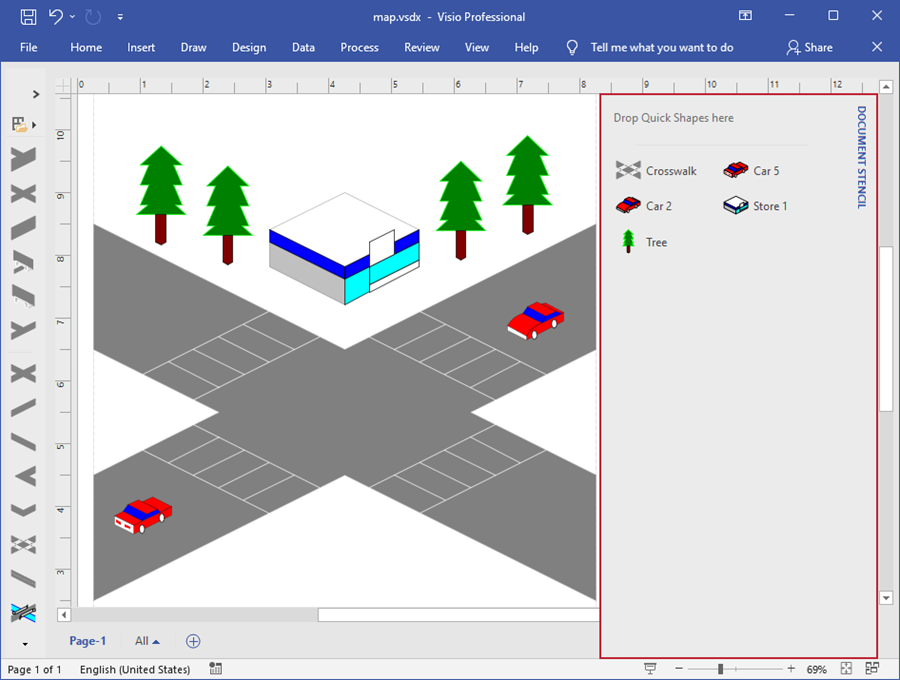
To render only master shapes contained in Visio file, enable the [VisioRenderingOptions.render_figures_only](https://reference.groupdocs.com/viewer/python-net/groupdocs.viewer.options/visiorenderingoptions/#properties) property for one of the following classes (depending on the output file format):
* [HtmlViewOptions](https://reference.groupdocs.com/viewer/python-net/groupdocs.viewer.options/htmlviewoptions)
* [PdfViewOptions](https://reference.groupdocs.com/viewer/python-net/groupdocs.viewer.options/pdfviewoptions)
* [PngViewOptions](https://reference.groupdocs.com/viewer/python-net/groupdocs.viewer.options/pngviewoptions)
* [JpgViewOptions](https://reference.groupdocs.com/viewer/python-net/groupdocs.viewer.options/jpgviewoptions)
The [VisioRenderingOptions.figure_width](https://reference.groupdocs.com/viewer/python-net/groupdocs.viewer.options/visiorenderingoptions/#properties) property allows you to specify the shape width in pixels. The height is calculated automatically based on the aspect ratio of each shape.
{{< tabs "example6">}}
{{< tab "Python" >}}
```python
from groupdocs.viewer import Viewer
from groupdocs.viewer.options import PdfViewOptions
def render_visio_shapes_only():
# Load Visio document
with Viewer("map.vsdx") as viewer:
# Convert the Visio file to PDF.
viewOptions = PdfViewOptions("render_visio_shapes_only/visio_shapes_only.pdf")
# Render the master shapes only.
viewOptions.visio_rendering_options.render_figures_only = True
# Specify shape width in pixels.
viewOptions.visio_rendering_options.figure_width = 200
viewer.view(viewOptions)
if __name__ == "__main__":
render_visio_shapes_only()
```
{{< /tab >}}
{{< tab "map.vsdx" >}}
{{< tab-text >}}
`map.vsdx` is the sample file used in this example. Click [here](https://docs.groupdocs.com/viewer/python-net/_sample_files/rendering-basics/render-visio-documents/map.vsdx) to download it.
{{< /tab-text >}}
{{< /tab >}}
{{< tab "visio_shapes_only.pdf" >}}
```text
Binary file (PDF, 27 KB)
```
[Download full output](https://docs.groupdocs.com/viewer/python-net/_output_files/rendering-basics/render-visio-documents/render_visio_shapes_only/visio_shapes_only.pdf)
{{< /tab >}}
{{< /tabs >}}