# Render to HTML
With GroupDocs.Viewer for .NET you can render files to HTML format. As a simple usecase please see how easily you can convert Microsoft Word to clean html.
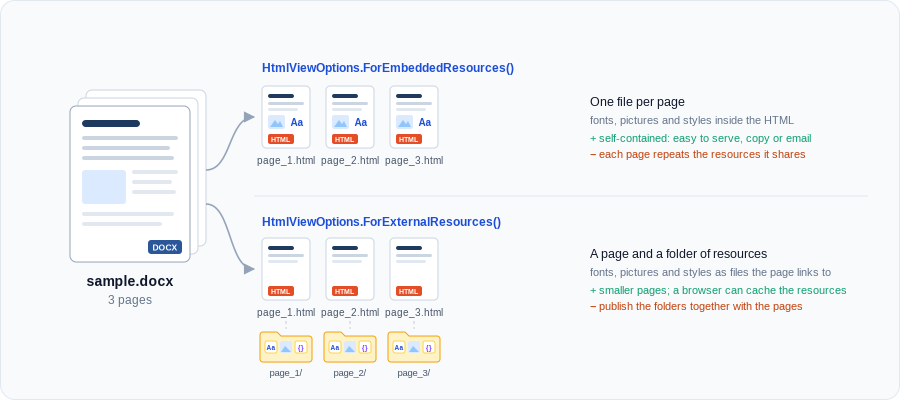
When rendering to HTML, GroupDocs.Viewer renders each page of the source document as a separate HTML document.
GroupDocs.Viewer for .NET provides two options to manage CSS, fonts, images, and other resources:
1. HTML with external resources stores page resources as separate files. This allows reusing common resources and results in reducing page size and loading speed.
2. HTML with embedded resources integrates page resources into HTML. This makes each document page self-sufficient but results in increasing page size and loading speed.
To render files to HTML, follow these steps:
1. Create an instance of the [Viewer](https://reference.groupdocs.com/net/viewer/groupdocs.viewer/viewer) class. Specify the source document path as a constructor parameter.
2. Instantiate the [HtmlViewOptions](https://reference.groupdocs.com/net/viewer/groupdocs.viewer.options/htmlviewoptions) object. Specify a path to save the rendered pages.
3. Call the [View](https://reference.groupdocs.com/net/viewer/groupdocs.viewer/viewer/methods/view) method of the [Viewer](https://reference.groupdocs.com/net/viewer/groupdocs.viewer/viewer) object. Specify the [HtmlViewOptions](https://reference.groupdocs.com/net/viewer/groupdocs.viewer.options/htmlviewoptions) object as the parameter.
## Rendering to HTML with external resources
The following code snippet shows how to render a .docx document to HTML with external resources:
{{< tabs "render-to-html-external">}}
{{< tab "C#" >}}
```csharp
using GroupDocs.Viewer;
using GroupDocs.Viewer.Options;
// ...
using (Viewer viewer = new Viewer("sample.docx"))
{
// Create view options.
var viewOptions = HtmlViewOptions.ForExternalResources();
viewer.View(viewOptions);
}
```
{{< /tab >}}
{{< tab "VB.NET">}}
```vb
Imports GroupDocs.Viewer
Imports GroupDocs.Viewer.Options
' ...
Module Program
Sub Main(args As String())
Using viewer As Viewer = New Viewer("sample.docx")
' Create view options.
Dim viewOptions = HtmlViewOptions.ForExternalResources()
viewer.View(viewOptions)
End Using
End Sub
End Module
```
{{< /tab >}}
{{< tab "sample.docx" >}}
{{< tab-text >}}
`sample.docx` is the sample file used in this example. Click [here](https://docs.groupdocs.com/viewer/net/_sample_files/developer-guide/rendering-documents/rendering-to-html/sample.docx) to download it.
{{< /tab-text >}}
{{< /tab >}}
{{< tab "render-to-html-external.zip" >}}
```text
p_1.html (2 KB)
p_1_f.woff (20 KB)
p_1_f1.woff (9 KB)
p_1_f2.woff (10 KB)
p_1_i.jpeg (126 KB)
p_1_i.png (4 KB)
p_1_s.css (1 KB)
p_2.html (9 KB)
p_2_f.woff (15 KB)
p_2_f1.woff (29 KB)
[TRUNCATED] (35 files total)
```
[Download full output](https://docs.groupdocs.com/viewer/net/_output_files/developer-guide/rendering-documents/rendering-to-html/_index/RenderToHtmlExternal/render-to-html-external.zip)
{{< /tab >}}
{{< /tabs >}}
## Rendering to HTML with embedded resources
The following code snippet shows how to render a .docx document to HTML with embedded resources:
{{< tabs "render-to-html-embedded">}}
{{< tab "C#" >}}
```csharp
using GroupDocs.Viewer;
using GroupDocs.Viewer.Options;
// ...
using (Viewer viewer = new Viewer("sample.docx"))
{
// Create view options.
var viewOptions = HtmlViewOptions.ForEmbeddedResources();
viewer.View(viewOptions);
}
```
{{< /tab >}}
{{< tab "VB.NET">}}
```vb
Imports GroupDocs.Viewer
Imports GroupDocs.Viewer.Options
' ...
Module Program
Sub Main(args As String())
Using viewer As Viewer = New Viewer("sample.docx")
' Create view options.
Dim viewOptions = HtmlViewOptions.ForEmbeddedResources()
viewer.View(viewOptions)
End Using
End Sub
End Module
```
{{< /tab >}}
{{< tab "sample.docx" >}}
{{< tab-text >}}
`sample.docx` is the sample file used in this example. Click [here](https://docs.groupdocs.com/viewer/net/_sample_files/developer-guide/rendering-documents/rendering-to-html/sample.docx) to download it.
{{< /tab-text >}}
{{< /tab >}}
{{< tab "render-to-html-embedded.zip" >}}
```text
p_1.html (228 KB)
p_2.html (110 KB)
p_3.html (142 KB)
p_4.html (885 KB)
p_5.html (86 KB)
```
[Download full output](https://docs.groupdocs.com/viewer/net/_output_files/developer-guide/rendering-documents/rendering-to-html/_index/RenderToHtmlEmbedded/render-to-html-embedded.zip)
{{< /tab >}}
{{< /tabs >}}
## Preserving or disabling JavaScript when rendering to HTML
Lots of the document formats and format families, supported by the GroupDocs.Viewer, may contain different scripts (and/or macros) inside their content. This includes (but not limited to) PDF, most of formats from the WordProcessing family (DOCX, DOCM, RTF, ODT, ...), Spreadsheet (XLSX, XLSM, ...), Presentation (PPTX, PPTM, ...), Email (MSG, EML, EMLX, MBOX, ...), and so on. Before the [version 25.2](https://releases.groupdocs.com/viewer/net/release-notes/2025/groupdocs-viewer-for-net-25-2-release-notes/), when rendering documents with scripts to the HTML format, the GroupDocs.Viewer tried to preserve all the script and put them to the resultant HTML document without any change or validation. However, in some cases this is an unwanted behaviour, because document can contain malicious or harmful script(s), in most common, the XSS injections, so it is necessary to clean the resultant HTML document from any scripts.
Starting from the version 25.2 the default behaviour was changed — now GroupDocs.Viewer removes all the scripts from the resultant HTML document by default. In some cases, when the JavaScript code is located in the links, the GroupDocs.Viewer replaces it onto the `"javascript:void(0)"` string, so there will be no page reload when opening the resulted HTML document in the browser. Need to mention that the original document, loaded to the [`Viewer`](https://reference.groupdocs.com/net/viewer/groupdocs.viewer/viewer) instance, will be untouched anyway.
Along with the changed default behavior, a new option was added to the [`HtmlViewOptions`](https://reference.groupdocs.com/net/viewer/groupdocs.viewer.options/htmlviewoptions) class — a public property `RemoveJavaScript` of the [`System.Boolean`](https://learn.microsoft.com/dotnet/api/system.boolean) type. By default this property has a `true` value — JavaScript will be removed from the resultant HTML document. For preserving the JavaScript, as it was in the previous versions of the GroupDocs.Viewer (before 25.2), the `false` value should be assigned to this property.
Code sample below shows opening a sample XLSX document and rendering it twice:
1. to the HTML with embedded resources with disabled JavaScript;
2. to the HTML with external resources with enabled JavaScript;
{{< tabs "render-html-with-and-without-javascript">}}
{{< tab "C#" >}}
```csharp
using GroupDocs.Viewer;
using GroupDocs.Viewer.Options;
// ...
HtmlViewOptions withoutJavaScriptEmbedded = HtmlViewOptions.ForEmbeddedResources("without-js-page{0}.html");
HtmlViewOptions withJavaScriptExternal = HtmlViewOptions.ForExternalResources("with-js-page{0}.html", "with-js-page{0}/resource-{1}", "with-js-page{0}/resource-{1}");
withJavaScriptExternal.RemoveJavaScript = false;
using (var viewer = new Viewer("with_script.xlsx"))
{
viewer.View(withoutJavaScriptEmbedded);
viewer.View(withJavaScriptExternal);
}
```
{{< /tab >}}
{{< tab "VB.NET">}}
```vb
Imports GroupDocs.Viewer
Imports GroupDocs.Viewer.Options
' ...
Dim withoutJavaScriptEmbedded = HtmlViewOptions.ForEmbeddedResources("without-js-page{0}.html")
Dim withJavaScriptExternal = HtmlViewOptions.ForExternalResources("with-js-page{0}.html", "with-js-page{0}/resource-{1}", "with-js-page{0}/resource-{1}")
withJavaScriptExternal.RemoveJavaScript = false;
Using viewer = New Viewer("with_script.xlsx")
viewer.View(withoutJavaScriptEmbedded)
viewer.View(withJavaScriptExternal)
End Using
```
{{< /tab >}}
{{< tab "with_script.xlsx" >}}
{{< tab-text >}}
`with_script.xlsx` is the sample file used in this example. Click [here](https://docs.groupdocs.com/viewer/net/_sample_files/developer-guide/rendering-documents/rendering-to-html/with_script.xlsx) to download it.
{{< /tab-text >}}
{{< /tab >}}
{{< tab "render-html-with-and-without-javascript.zip" >}}
```text
with-js-page1.html (8 KB)
with-js-page1/resource-s.css (4 KB)
without-js-page1.html (67 KB)
```
[Download full output](https://docs.groupdocs.com/viewer/net/_output_files/developer-guide/rendering-documents/rendering-to-html/_index/RenderHtmlWithAndWithoutJavascript/render-html-with-and-without-javascript.zip)
{{< /tab >}}
{{< /tabs >}}
## Additional features
For details, please refer to the following pages:
## Contents
- [Render with responsive layout](https://docs.groupdocs.com/viewer/net/render-with-responsive-layout.md)
- [Optimize output for printing](https://docs.groupdocs.com/viewer/net/how-to-optimize-output-html-for-printing.md)
- [Exclude fonts](https://docs.groupdocs.com/viewer/net/exclude-fonts.md)
- [Minify HTML](https://docs.groupdocs.com/viewer/net/minify-html.md)
- [Set image size limits](https://docs.groupdocs.com/viewer/net/set-image-size-limits-when-rendering-to-html.md)