Cache results Leave feedback
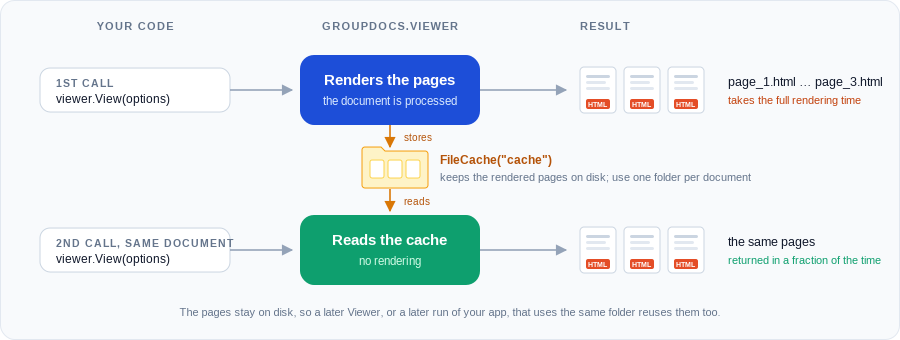
Caching saves rendering results to a specified location, such as a local disk. When you re-request the rendering results, GroupDocs.Viewer does not render again, but uses the cached results. As a document can take a long time to render, use caching if you expect to reuse the rendering results.
To enable caching, follow these steps:
- Instantiate the desired cache object (for example, FileCache to store document rendering results at the local drive)
- Instantiate the ViewerSettings object. Specify the cache object as a parameter of the constructor.
- Instantiate the Viewer object. Specify the ViewerSettings object as a parameter of the constructor.
- Call the View method of the Viewer class.
The following code snippet shows how to enable caching and displays the difference between rendering a file and getting the cached results:
using System;
using System.Diagnostics;
using System.IO;
using GroupDocs.Viewer;
using GroupDocs.Viewer.Caching;
using GroupDocs.Viewer.Options;
// ...

string outputDirectory = "output";
string cachePath = Path.Combine(outputDirectory, "cache");
string pageFilePathFormat = Path.Combine(outputDirectory, "page_{0}.html");
// Create a cache.
FileCache cache = new FileCache(cachePath);
ViewerSettings settings = new ViewerSettings(cache);

using (Viewer viewer = new Viewer("sample.docx", settings))
{
    // Create an HTML file.
    HtmlViewOptions options = HtmlViewOptions.ForEmbeddedResources(pageFilePathFormat);
    // Render and display the rendering time.
    Stopwatch stopWatch = Stopwatch.StartNew();
    viewer.View(options);
    stopWatch.Stop();
    Console.WriteLine("Time taken on first call to View method {0} (ms).", stopWatch.ElapsedMilliseconds);
    // Get cached results and display the time.
    stopWatch.Restart();
    viewer.View(options);
    stopWatch.Stop();
    Console.WriteLine("Time taken on second call to View method {0} (ms).", stopWatch.ElapsedMilliseconds);
}
Imports System
Imports System.Diagnostics
Imports System.IO
Imports GroupDocs.Viewer
Imports GroupDocs.Viewer.Caching
Imports GroupDocs.Viewer.Options
' ...

Module Program
    Sub Main(args As String())
            Dim outputDirectory As String = "output"
            Dim cachePath As String = Path.Combine(outputDirectory, "cache")
            Dim pageFilePathFormat As String = Path.Combine(outputDirectory, "page_{0}.html")
            ' Create a cache.
            Dim cache As FileCache = New FileCache(cachePath)
            Dim settings As ViewerSettings = New ViewerSettings(cache)

            Using viewer As Viewer = New Viewer("sample.docx", settings)
                ' Create an HTML file.
                Dim options As HtmlViewOptions = HtmlViewOptions.ForEmbeddedResources(pageFilePathFormat)
                ' Render and display the rendering time.
                Dim stopWatch As Stopwatch = Stopwatch.StartNew()
                viewer.View(options)
                stopWatch.[Stop]()
                Console.WriteLine("Time taken on first call to View method {0} (ms).", stopWatch.ElapsedMilliseconds)
                ' Get cached results and display the time.
                stopWatch.Restart()
                viewer.View(options)
                stopWatch.[Stop]()
                Console.WriteLine("Time taken on second call to View method {0} (ms).", stopWatch.ElapsedMilliseconds)
            End Using
    End Sub
End Module
sample.docx is the sample file used in this example. Click here to download it.
Time taken on first call to View method 9303 (ms).
Time taken on second call to View method 65 (ms).
For details, please refer to the following pages:
Was this page helpful?
Any additional feedback you'd like to share with us?
Please tell us how we can improve this page.
Thank you for your feedback!
We value your opinion. Your feedback will help us improve our documentation.
