# HTML
Extract document text as HTML with GroupDocs.Parser for Node.js via Java.
The following example shows how to extract HTML formatted text:
```javascript
const groupdocs = require('@groupdocs/groupdocs.parser');
// Create an instance of Parser class
const parser = new groupdocs.Parser('sample.docx');
try {
// Extract a formatted text into the reader
const reader = parser.getFormattedText(new groupdocs.FormattedTextOptions(groupdocs.FormattedTextMode.Html));
// If formatted text extraction isn't supported, a reader is null
if (reader == null) {
console.log("Formatted text extraction isn't supported");
} else {
try {
// Print a formatted text from the document
console.log(reader.readToEnd());
} finally {
reader.close();
}
}
} finally {
parser.close();
}
process.exit(0);
```
| Tag | Description |
| --- | --- |
| `p` | Paragraph is surrounded by `p` tag |
| `a` | Hyperlinks |
| `b` | Text with Bold font is surrounded by `b` tag |
| `i` | Text with Italic font is surrounded by `i` tag |
| `h1` - `h6` | If the heading has 'Heading X' style, it's surrounded by `` tag |
| `ol` / `ul` | Numbering and bullets lists |
| `table` | Tables |
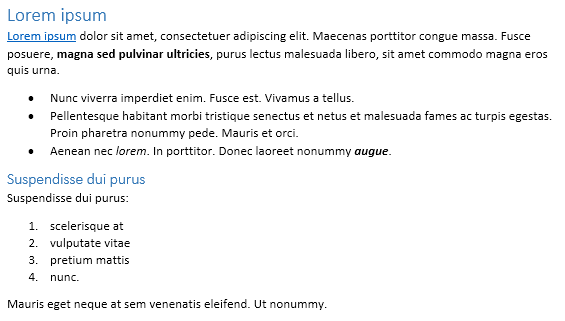
The following Microsoft Word document is used as input document:
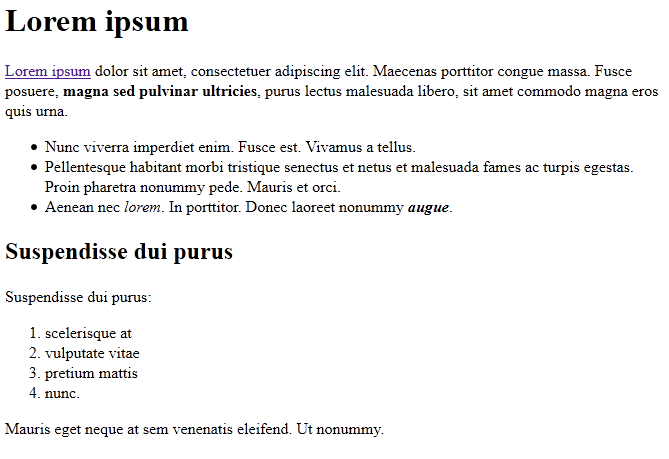
The following HTML document is extracted using the example above:
## More resources
### Free online document parser App
Along with the full-featured library we provide simple but powerful free apps.
You are welcome to extract data from PDF, DOC, DOCX, PPT, PPTX, XLS, XLSX, Emails and more with our [Free Online Document Parser App](https://products.groupdocs.app/parser).