# HTML
This article explains that how to extract HTML formatted text from document page in Java.
The following example shows how to extract HTML formatted text:
```java
// Create an instance of Parser class
try (Parser parser = new Parser(Constants.SampleDocx)) {
// Extract a formatted text into the reader
try (TextReader reader = parser.getFormattedText(new FormattedTextOptions(FormattedTextMode.Html))) {
// Print a formatted text from the document
// If formatted text extraction isn't supported, a reader is null
System.out.println(reader == null ? "Formatted text extraction isn't suppported" : reader.readToEnd());
}
}
```
| Tag | Description |
| --- | --- |
| `p` | Paragraph is surrounded by `p` tag |
| `a` | Hyperlinks |
| `b` | Text with Bold font is surrounded by `b` tag |
| `i` | Text with Italic font is surrounded by `i` tag |
| `h1` - `h6` | If the heading has 'Heading X' style, it's surrounded by `` tag |
| `ol` / `ul` | Numbering and bullets lists |
| `table` | Tables |
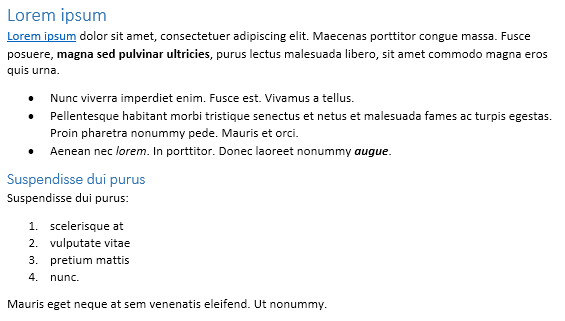
The following Microsoft Word document is used as input document:
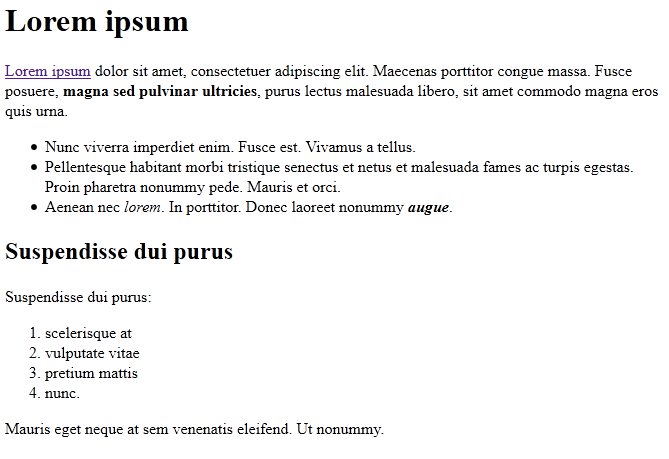
The following HTML document is extracted using the example above:
## More resources
### GitHub examples
You may easily run the code above and see the feature in action in our GitHub examples:
* [GroupDocs.Parser for .NET examples](https://github.com/groupdocs-parser/GroupDocs.Parser-for-.NET)
* [GroupDocs.Parser for Java examples](https://github.com/groupdocs-parser/GroupDocs.Parser-for-Java)
### Free online document parser App
Along with full featured Java library we provide simple, but powerful free Apps.
You are welcome to extract data from PDF, DOC, DOCX, PPT, PPTX, XLS, XLSX, Emails and more with our free online [Free Online Document Parser App](https://products.groupdocs.app/parser).