Word Track Changes Leave feedback
On this page
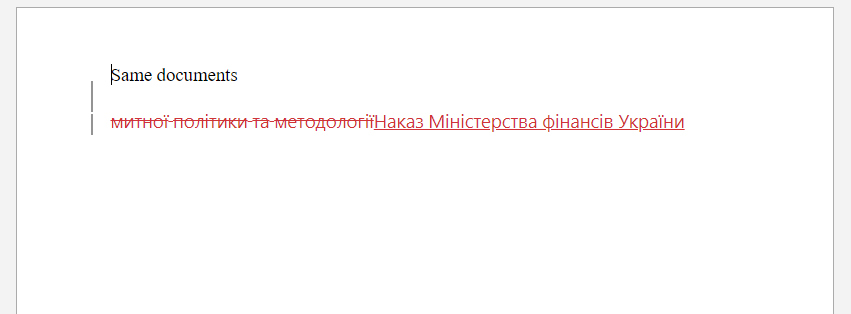
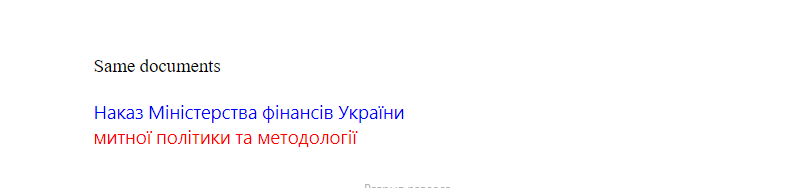
By default, GroupDocs.Comparison includes Microsoft Word Track Changes (revisions) during comparison. Use CompareOptions.word_track_changes to toggle that behaviour.
Detect and include tracked revisions (changes, comments, insertions, deletions) from the source document so that any previously tracked changes are preserved in the comparison output.
from groupdocs.comparison import Comparer
from groupdocs.comparison.options import CompareOptions

def include_word_track_changes():
    with Comparer("./source-with-revisions.docx") as comparer:
        comparer.add("./target.docx")
        options = CompareOptions()
        options.word_track_changes = True
        comparer.compare("./result.docx", options)

if __name__ == "__main__":
    include_word_track_changes()
source-with-revisions.docx is the source file used in this example. Click here to download it.
target.docx is the target file used in this example. Click here to download it.
Binary file (DOCX, 25 KB)
Compare only the final text and ignore previously tracked revisions so historical edits do not affect the diff.
from groupdocs.comparison import Comparer
from groupdocs.comparison.options import CompareOptions

def ignore_word_track_changes():
    with Comparer("./source-with-revisions.docx") as comparer:
        comparer.add("./target.docx")
        options = CompareOptions()
        options.word_track_changes = False
        comparer.compare("./result.docx", options)

if __name__ == "__main__":
    ignore_word_track_changes()
source-with-revisions.docx is the source file used in this example. Click here to download it.
target.docx is the target file used in this example. Click here to download it.
Binary file (DOCX, 30 KB)
Use case: produce a clean diff focused on current content for executive review.
Note: the availability of particular options can depend on the document format and library version.
The result is as follows:
| word_track_changes = True |
|---|
 |
| word_track_changes = False |
|---|
 |
Was this page helpful?
Any additional feedback you'd like to share with us?
Please tell us how we can improve this page.
Thank you for your feedback!
We value your opinion. Your feedback will help us improve our documentation.


