Show Gap Lines Instead of Changes Leave feedback
On this page
GroupDocs.Comparison for Python via .NET can produce redacted-style results in which inserted and deleted content is hidden and replaced with empty gap lines. The layout alignment is preserved so readers can see where changes occurred without seeing the changed text.
from groupdocs.comparison import Comparer
from groupdocs.comparison.options import CompareOptions

def show_gap_lines():
    with Comparer("./source.docx") as comparer:
        comparer.add("./target.docx")
        options = CompareOptions()
        options.show_inserted_content = False
        options.show_deleted_content = False
        options.leave_gaps = True
        comparer.compare("./result.docx", options)

if __name__ == "__main__":
    show_gap_lines()
source.docx is the source file used in this example. Click here to download it.
target.docx is the target file used in this example. Click here to download it.
Binary file (DOCX, 25 KB)
Use case: provide redacted-style diffs that keep layout alignment without showing actual changed text.
The result is as follows:
| Default result | Result without LeaveGaps |
|---|---|
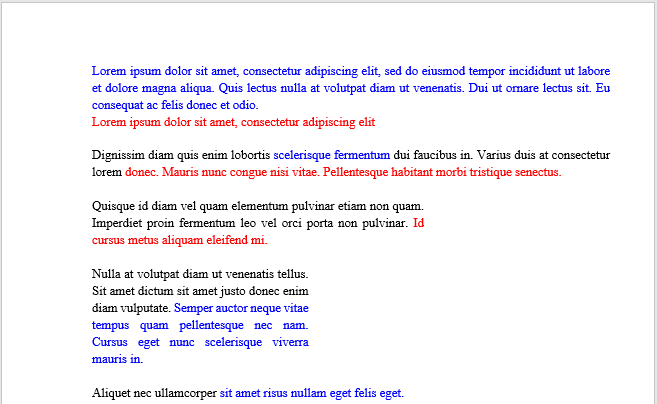 | 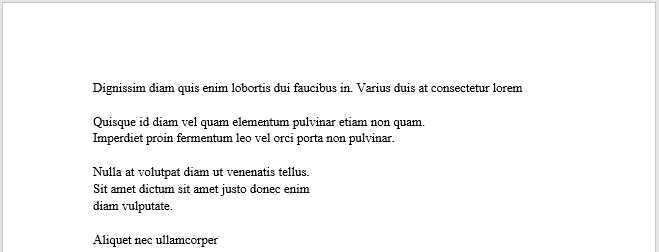 |
| Default result | Result with LeaveGaps |
|---|---|
| 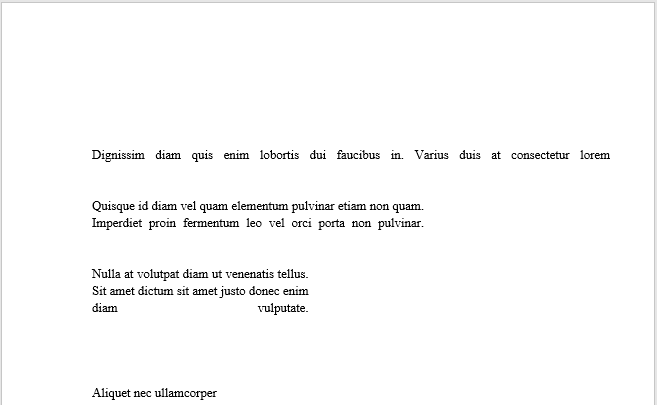 |
Gap-line output is useful in two scenarios:
- Redacted-style diffs for regulatory review. Reviewers can see where changes occurred and how many without seeing the actual content — useful when the comparison artifact will be circulated more widely than the underlying documents.
- Visual change density reporting. A gap-line result document gives a quick visual sense of how much was changed and where, without the cognitive load of reading every diff.
For full-content review use the default settings (show_inserted_content = True, show_deleted_content = True, leave_gaps = False).
- Show revisions — another way to produce a “clean” result by hiding revision markers.
- Customize changes styles — full control over how visible changes look.
- Get only summary page — the most extreme form of redacted output: counts only, no content at all.
Was this page helpful?
Any additional feedback you'd like to share with us?
Please tell us how we can improve this page.
Thank you for your feedback!
We value your opinion. Your feedback will help us improve our documentation.


