Setting the Author of Changes Leave feedback
On this page
GroupDocs.Comparison for Python via .NET lets you set a custom revision-author name on the changes recorded in the result document. Useful for audit trails and to attribute changes to a specific reviewer or automated system.
from groupdocs.comparison import Comparer
from groupdocs.comparison.options import CompareOptions

def set_author_of_changes():
    with Comparer("./source.docx") as comparer:
        comparer.add("./target.docx")
        options = CompareOptions()
        options.show_revisions = True
        options.word_track_changes = True
        options.revision_author_name = "New author"
        comparer.compare("./result.docx", options)

if __name__ == "__main__":
    set_author_of_changes()
source.docx is the source file used in this example. Click here to download it.
target.docx is the target file used in this example. Click here to download it.
Binary file (DOCX, 24 KB)
The result is as follows:
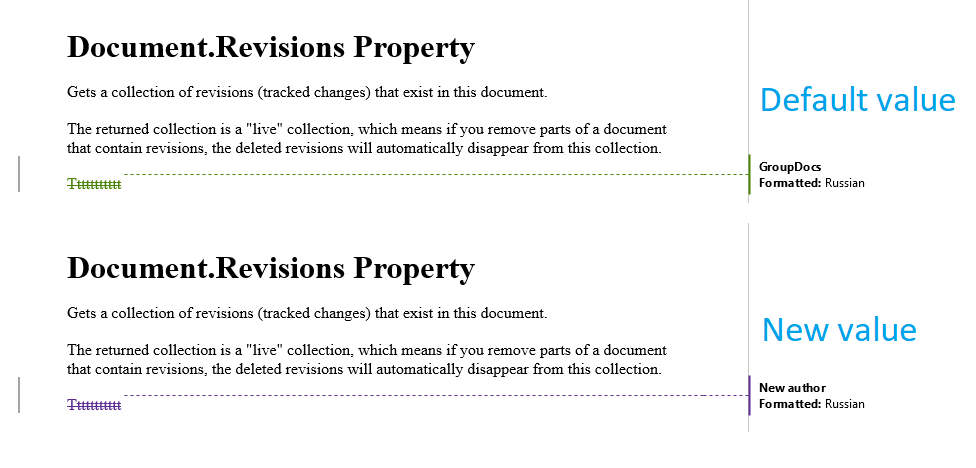
revision_author_name only takes effect when revisions are actually being written into the result document. Both of the following must be true:
word_track_changes = True— the comparison engine emits the diffs as Word Track Changes revisions.show_revisions = True— the revisions are displayed inline rather than hidden.
If either is False, revision_author_name is recorded in the underlying revision metadata but won’t surface in the rendered output.
- Multi-reviewer pipelines. Different automated processes can stamp their own author name so downstream reviewers see who (or what) generated each change.
- Audit trails. Compliance workflows that need to record an explicit “Comparison performed by” attribution on every diffed document.
- Anonymising changes. Strip personal names from automation output (e.g., set
revision_author_name = "Automated Diff").
- Word track changes — the underlying revision-writing mechanism.
- Show revisions — toggle revision visibility in the result.
- Accept or reject revisions — process the stamped revisions afterwards.
Was this page helpful?
Any additional feedback you'd like to share with us?
Please tell us how we can improve this page.
Thank you for your feedback!
We value your opinion. Your feedback will help us improve our documentation.


