Get Extended Information on the Summary Page Leave feedback
On this page
GroupDocs.Comparison for Python via .NET can append a summary page with extended statistics to the comparison result, going beyond the basic insert/delete/modify counts.
from groupdocs.comparison import Comparer
from groupdocs.comparison.options import CompareOptions

def get_extended_summary_information():
    with Comparer("./source.docx") as comparer:
        comparer.add("./target.docx")
        options = CompareOptions()
        options.extended_summary_page = True
        comparer.compare("./result.docx", options)

if __name__ == "__main__":
    get_extended_summary_information()
source.docx is the source file used in this example. Click here to download it.
target.docx is the target file used in this example. Click here to download it.
Binary file (DOCX, 26 KB)
Use case: provide management with detailed metrics beyond the standard summary counts.
The result is as follows:
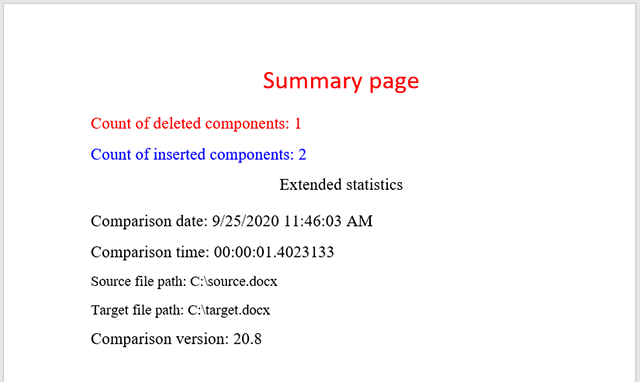
The extended summary expands the default change-count summary with:
- Per-section change counts (header, body, footer, footnotes).
- Style-change counts broken out from content-change counts.
- Document-property diffs (when combined with
compare_document_property = True). - Page-by-page change distribution.
| Option | Result content | Use it when |
|---|---|---|
generate_summary_page = True | Result document body + appended summary page | You want both the diff and a high-level overview |
show_only_summary_page = True | Only the summary page, no body | You want to share a concise overview without exposing full document content |
extended_summary_page = True | Adds per-section statistics to whichever summary mode is active | You’re reporting to non-technical stakeholders who need the breakdown |
- Get only summary page — produce a summary-only result document.
- Compare variables and document properties — surface metadata diffs in the summary.
- Get list of changes — programmatic access to the same data.
Was this page helpful?
Any additional feedback you'd like to share with us?
Please tell us how we can improve this page.
Thank you for your feedback!
We value your opinion. Your feedback will help us improve our documentation.


