Compare Variables and Document Properties Leave feedback
On this page
GroupDocs.Comparison for Python via .NET can detect changes in Word document properties — variable, built-in, and custom.
from groupdocs.comparison import Comparer
from groupdocs.comparison.options import CompareOptions

def compare_variables_and_document_properties():
    with Comparer("./source.docx") as comparer:
        comparer.add("./target.docx")
        options = CompareOptions()
        options.compare_variable_property = True
        options.compare_document_property = True
        comparer.compare("./result.docx", options)

if __name__ == "__main__":
    compare_variables_and_document_properties()
source.docx is the source file used in this example. Click here to download it.
target.docx is the target file used in this example. Click here to download it.
Binary file (DOCX, 26 KB)
Use case: ensure key metadata values remain consistent across document versions.
The result is as follows:
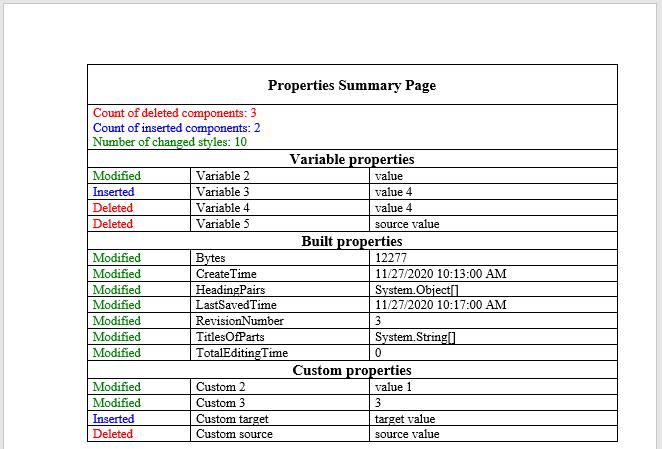
Microsoft Word recognises three property surfaces:
| Property type | Examples | CompareOption |
|---|---|---|
| Built-in properties | Title, Author, Subject, Created, Last modified | compare_document_property |
| Custom properties | Any user-defined key/value pair (Department, Project code) | compare_document_property |
| Document variables | Mail-merge fields, automation variables set via VBA / templating tools | compare_variable_property |
compare_document_property = True covers built-in AND custom properties. compare_variable_property = True specifically targets the document-variables surface — this is most useful when comparing generated documents (mail-merge output, templating engines like Jinja-into-Word) where the variable values are the meaningful diff.
- Compare Word documents — the base Word-comparison flow.
- Compare bookmarks in Word documents — another Word-only metadata-style compare.
- Get extended information on the summary page — surface property diffs prominently in the summary.
Was this page helpful?
Any additional feedback you'd like to share with us?
Please tell us how we can improve this page.
Thank you for your feedback!
We value your opinion. Your feedback will help us improve our documentation.


