Compare Multiple Documents Leave feedback
On this page
NoteMulti-target comparison is supported for Microsoft Word documents, Microsoft PowerPoint presentations, and OpenDocument presentations.
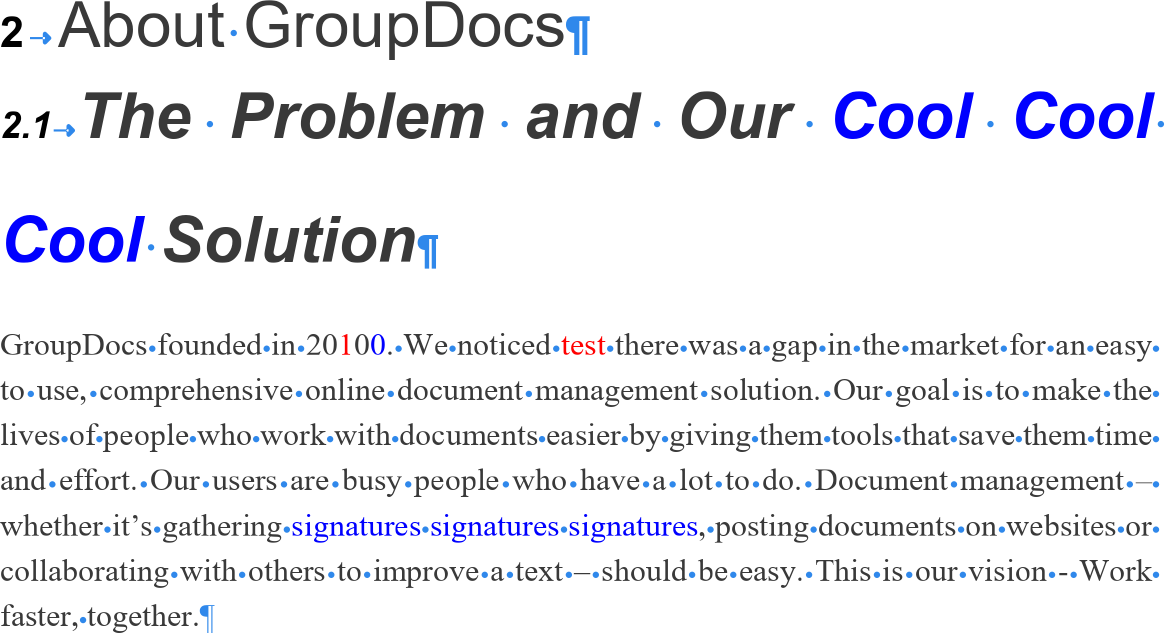
GroupDocs.Comparison can compare a source document against more than two targets in a single operation. Call add() for every target before calling compare().
- Instantiate a
Comparerwith the source document path or stream. - Call
add()for each target document. Repeat for every target. - Call
compare()and specify the result file path or output stream.
from groupdocs.comparison import Comparer

def compare_multiple_documents():
    with Comparer("./source.docx") as comparer:
        comparer.add("./target1.docx")
        comparer.add("./target2.docx")
        comparer.add("./target3.docx")
        comparer.compare("./result.docx")
        print("Documents compared successfully. Result saved to result.docx.")

if __name__ == "__main__":
    compare_multiple_documents()
source.docx is the source file used in this example. Click here to download it.
target1.docx is a target file used in this example. Click here to download it.
target2.docx is a target file used in this example. Click here to download it.
target3.docx is a target file used in this example. Click here to download it.
Binary file (DOCX, 25 KB)
The result is as follows:
For workflows that don’t use the local file system, use streams for both inputs and the result:
from groupdocs.comparison import Comparer

def compare_multiple_documents_stream():
    with open("./source.docx", "rb") as src, \
         open("./target1.docx", "rb") as t1, \
         open("./target2.docx", "rb") as t2, \
         open("./target3.docx", "rb") as t3:
        with Comparer(src) as comparer:
            comparer.add(t1)
            comparer.add(t2)
            comparer.add(t3)
            with open("./result.docx", "wb") as out_stream:
                comparer.compare(out_stream)

if __name__ == "__main__":
    compare_multiple_documents_stream()
source.docx is the source file used in this example. Click here to download it.
target1.docx is a target file used in this example. Click here to download it.
Binary file (DOCX, 25 KB)
Pass a CompareOptions instance to customize how the comparison is rendered — for example, to highlight inserted items in a specific colour.
from groupdocs.comparison import Comparer, Color
from groupdocs.comparison.options import CompareOptions, StyleSettings


def compare_multiple_documents_settings():
    with Comparer("./source.docx") as comparer:
        comparer.add("./target1.docx")
        comparer.add("./target2.docx")
        comparer.add("./target3.docx")

        options = CompareOptions()
        options.inserted_item_style = StyleSettings()
        options.inserted_item_style.font_color = Color.from_name("yellow")

        comparer.compare("./result.docx", options)

if __name__ == "__main__":
    compare_multiple_documents_settings()
source.docx is the source file used in this example. Click here to download it.
target1.docx is a target file used in this example. Click here to download it.
Binary file (DOCX, 25 KB)
When the source or target documents are password-protected, supply the password through a LoadOptions object when constructing the Comparer and when calling add().
from groupdocs.comparison import Comparer
from groupdocs.comparison.options import LoadOptions

def compare_multiple_documents_protected():
    source_load = LoadOptions()
    source_load.password = "1234"

    with Comparer("./source_protected.docx", source_load) as comparer:
        for target, password in (
            ("./target_protected.docx", "5678"),
            ("./target2_protected.docx", "5678"),
            ("./target3_protected.docx", "5678"),
        ):
            load_opts = LoadOptions()
            load_opts.password = password
            comparer.add(target, load_opts)

        comparer.compare("./result.docx")

if __name__ == "__main__":
    compare_multiple_documents_protected()
source_protected.docx is a password-protected source file. Click here to download it.
target_protected.docx is a password-protected target file. Click here to download it.
target2_protected.docx is a password-protected target file. Click here to download it.
target3_protected.docx is a password-protected target file. Click here to download it.
Binary file (DOCX, 25 KB)
- Compare documents — single-target comparison.
- Customize changes styles — full control over how changes are rendered.
- Load password-protected documents — single-document password handling.
Was this page helpful?
Any additional feedback you'd like to share with us?
Please tell us how we can improve this page.
Thank you for your feedback!
We value your opinion. Your feedback will help us improve our documentation.


