Compare Bookmarks in Word Documents Leave feedback
On this page
GroupDocs.Comparison for Python via .NET supports bookmark comparison in Word documents — enable compare_bookmarks on CompareOptions to detect differences in bookmarked ranges.
from groupdocs.comparison import Comparer
from groupdocs.comparison.options import CompareOptions

def compare_bookmarks_in_word():
    with Comparer("./source.docx") as comparer:
        comparer.add("./target.docx")
        options = CompareOptions()
        options.compare_bookmarks = True
        comparer.compare("./result.docx", options)

if __name__ == "__main__":
    compare_bookmarks_in_word()
source.docx is the source file used in this example. Click here to download it.
target.docx is the target file used in this example. Click here to download it.
Binary file (DOCX, 27 KB)
Use case: validate that critical bookmarked sections (e.g., contract clauses) remain unchanged.
The result is as follows:
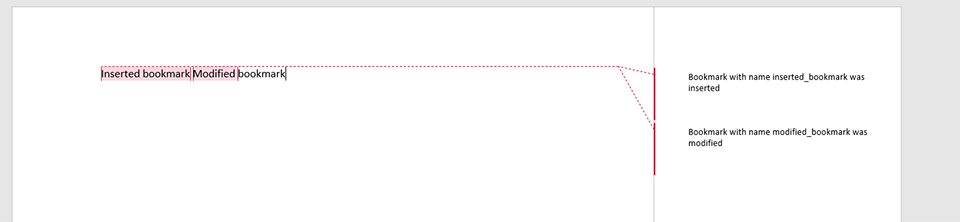
- Word-only. Bookmark comparison applies only to Microsoft Word documents (
.doc,.docx,.dot,.dotx). For other formats the option is silently ignored. - Interaction with
word_track_changes. Bookmark comparison runs alongside revision processing — if a bookmarked range contains tracked changes, both are surfaced in the result. - Bookmark content vs. bookmark definitions.
compare_bookmarks = Truedetects content changes inside bookmarked ranges. Pure bookmark-name renames without content change are not surfaced as content diffs.
- Compare Word documents — the base Word-comparison flow.
- Word track changes — include or ignore tracked revisions.
- Compare variables and document properties — also Word-specific.
Was this page helpful?
Any additional feedback you'd like to share with us?
Please tell us how we can improve this page.
Thank you for your feedback!
We value your opinion. Your feedback will help us improve our documentation.


