Compare Folders Leave feedback
On this page
GroupDocs.Comparison for Python via .NET can compare two folders, surface which files were added, deleted, or modified, and produce either a TXT or HTML report.
Steps:
- Instantiate
CompareOptions. - Set
directory_compare = True. - Optionally set
folder_comparison_extensiontoFolderComparisonExtension.HTMLfor an HTML report (the default is TXT). - Optionally set
show_only_changed = Trueto filter out unchanged items. - Create
Comparerwith the source folder path and theCompareOptions. - Call
add()with the target folder and the sameCompareOptions. - Call
compare_directory()with the result file path and theCompareOptions.
The example below uses the bare folder names SourceFolder and TargetFolder rather than ./SourceFolder so that the example-runner can detect them as shared sample directories. In your own code you can use any absolute or relative path — ./source-folder, /home/me/projects/src, etc.
from groupdocs.comparison import Comparer
from groupdocs.comparison.options import CompareOptions, FolderComparisonExtension

def compare_folders():
    compare_options = CompareOptions()
    compare_options.directory_compare = True
    compare_options.folder_comparison_extension = FolderComparisonExtension.HTML
    compare_options.show_only_changed = True

    with Comparer("SourceFolder", compare_options) as comparer:
        comparer.add("TargetFolder", compare_options)
        comparer.compare_directory("./result.html", compare_options)
        print("Folders compared successfully. Check output in result.html.")

if __name__ == "__main__":
    compare_folders()
<!DOCTYPE html><style>
details {
   padding-left: 20px;
}
details details
   padding-left: calc(100 % -20px);
}
details summary {
    padding-left: 20px;
    cursor: pointer;
[TRUNCATED]
Replace ./SourceFolder and ./TargetFolder with the directories you want to compare.
The following images show the comparison results:
| Result in HTML | Result in TXT |
|---|---|
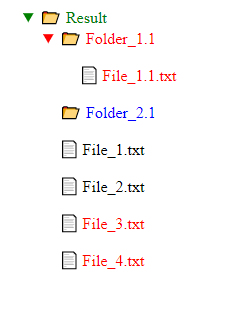 | 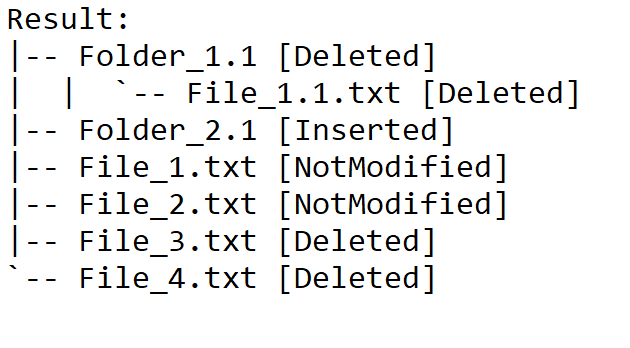 |
Was this page helpful?
Any additional feedback you'd like to share with us?
Please tell us how we can improve this page.
Thank you for your feedback!
We value your opinion. Your feedback will help us improve our documentation.


