Show results of comparison as a Word Track Changes Leave feedback
On this page
GroupDocs.Comparison allows you to customize the display of revisions in the output document.
Revision is a collection of changes received when comparing documents using built-in Word tools.
By default, the Word Track Changes option is false. The following code snippet shows how to enable Word Track Changes:
'use strict';

// Import the GroupDocs Comparison Node.js SDK
const groupdocs = require('@groupdocs/groupdocs.comparison');

// Define file paths for source, target, and result documents
const sourcePath = 'sample-files/source.docx';
const targetPath = 'sample-files/target.docx';
const resultPath = 'sample-files/result_word_track.docx';

// Create a comparer instance using the source document
const comparer = new groupdocs.Comparer(sourcePath);

// Add the target document to the comparison set
comparer.add(targetPath);

// Initialize comparison options
const options = new groupdocs.CompareOptions();

// Enable Word Track Changes in the output document
options.setWordTrackChanges(true);

// Perform the comparison and save the result to the specified path
comparer.compare(resultPath, options);

// Terminate the process with a success exit code
process.exit(0);
This example creates a Comparer instance with the source document, adds the target document, and creates a CompareOptions object. It enables Word Track Changes by setting setWordTrackChanges(true). When the comparison is performed, the result document will use Microsoft Word’s built-in Track Changes feature to display revisions, making it compatible with Word’s revision tracking system and allowing users to accept or reject changes directly in Word.
The result is as follows:
| WordTrackChanges true |
|---|
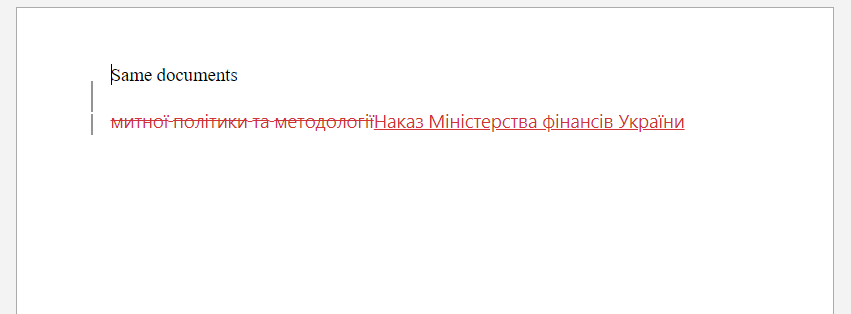 |
| WordTrackChanges false |
|---|
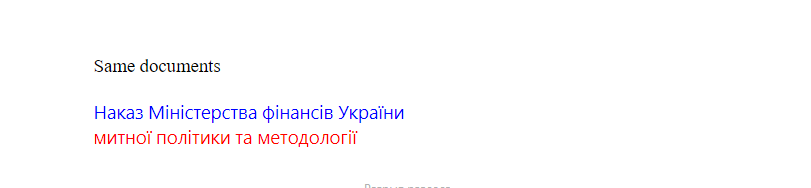 |
Was this page helpful?
Any additional feedback you'd like to share with us?
Please tell us how we can improve this page.
Thank you for your feedback!
We value your opinion. Your feedback will help us improve our documentation.


