# How to merge source code files
This article explains how to control file merging in GroupDocs.Comparison for Node.js via Java.
[GroupDocs.Comparison](https://products.groupdocs.com/comparison/nodejs-java) allows you to merge source code files by using the `ComparisonAction` properties:
- `ComparisonAction.ACCEPT` accepts the found changes and adds them to the file without highlighting
- `ComparisonAction.REJECT` rejects the found changes and removes them from the output file
For example, you need to compare and merge several versions of source code files and accept or discard changes made by different persons.

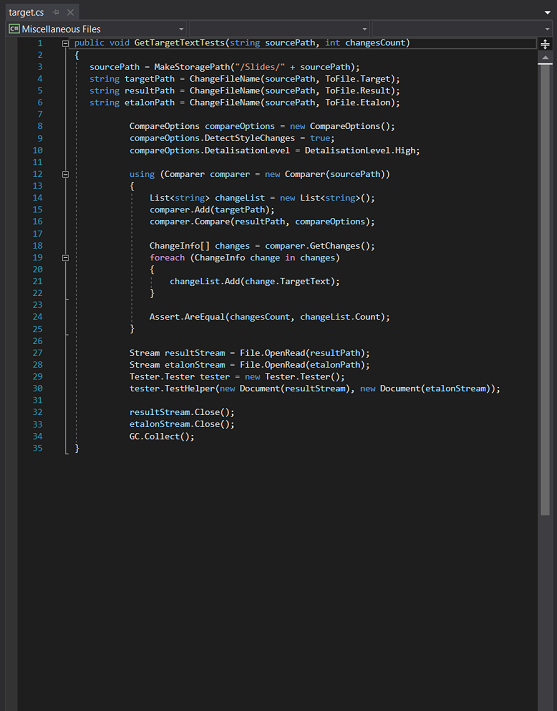
The differences show that the two methods are in the **source.cs** file: `AddNumbers` and `Sum`.
If you do not use the `ComparisonAction` property, all changes are committed to the output file, and these methods are removed. If you need to control the merging of files, the `ComparisonAction` property helps you.
The following code snippet shows how to merge two source code files:
```javascript
'use strict';
// Import the GroupDocs Comparison Node.js SDK
const groupdocs = require('@groupdocs/groupdocs.comparison');
const java = require('java');
// Define file paths for source, target, and output documents
const sourcePath = 'sample-files/source.docx';
const targetPath = 'sample-files/target.docx';
const outputPath = 'result.docx';
// Initialize comparer with the source document
const comparer = new groupdocs.Comparer(sourcePath);
// Add the target document to be compared against the source
comparer.add(targetPath);
// Execute the comparison operation
comparer.compare(outputPath);
// Retrieve the list of detected changes
const changes = comparer.getChanges();
// Accept the first 10 changes (or fewer if less than 10 exist)
for (let i = 0; i < 10 && i < changes.length; i++) {
changes[i].setComparisonAction(groupdocs.ComparisonAction.ACCEPT);
}
// Reject the remaining changes
for (let i = 10; i < changes.length; i++) {
changes[i].setComparisonAction(groupdocs.ComparisonAction.REJECT);
}
// Prepare options for applying changes
// Convert JavaScript array to Java array
const changeArray = java.newArray('com.groupdocs.comparison.result.ChangeInfo', changes);
const applyChangeOptions = new groupdocs.ApplyChangeOptions();
applyChangeOptions.setChanges(changeArray);
// Apply the changes to the source document and save the result
comparer.applyChanges(outputPath, applyChangeOptions);
// Terminate the process with a success exit code
process.exit(0);
```
This example creates a `Comparer` instance, adds the target document, and performs the comparison. It then retrieves all detected changes and selectively accepts the first 10 changes while rejecting the rest. The changes are converted to a Java array and wrapped in an `ApplyChangeOptions` object, which is then used with `applyChanges()` to generate the final merged document. This approach allows fine-grained control over which changes are included in the final result.
As a result, you get a merged source code file where the deleted elements are marked in **red**, the added – in **blue**, and the modified – in **green**.
Also, you receive an HTML file with changed places in the code.
| Result source code file | Result HTML file |
| ----------------------------------------------------------------------- | ------------------------------------------------------------------------- |
|  | 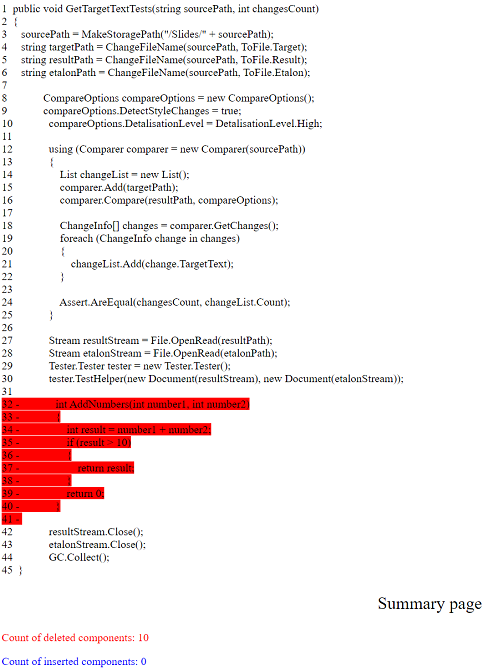 |
As you can see from the resulting files, only one of the two methods was removed.