# Compare documents
Compare two documents in Java with GroupDocs.Comparison for Java. Covers the basic Comparer workflow, file and stream inputs, default highlight colours, and the CompareOptions class for customizing the result.
[GroupDocs.Comparison](https://products.groupdocs.com/comparison/java) detects changes in text (paragraphs, words, characters), tables, images, and shapes across a wide range of formats — Word, PDF, Excel, PowerPoint, HTML, AutoCAD, Visio, Outlook, OpenDocument, images, and more. The full list is available on the [Supported document formats]({{< ref "/comparison/java/getting-started/supported-document-formats.md" >}}) page.
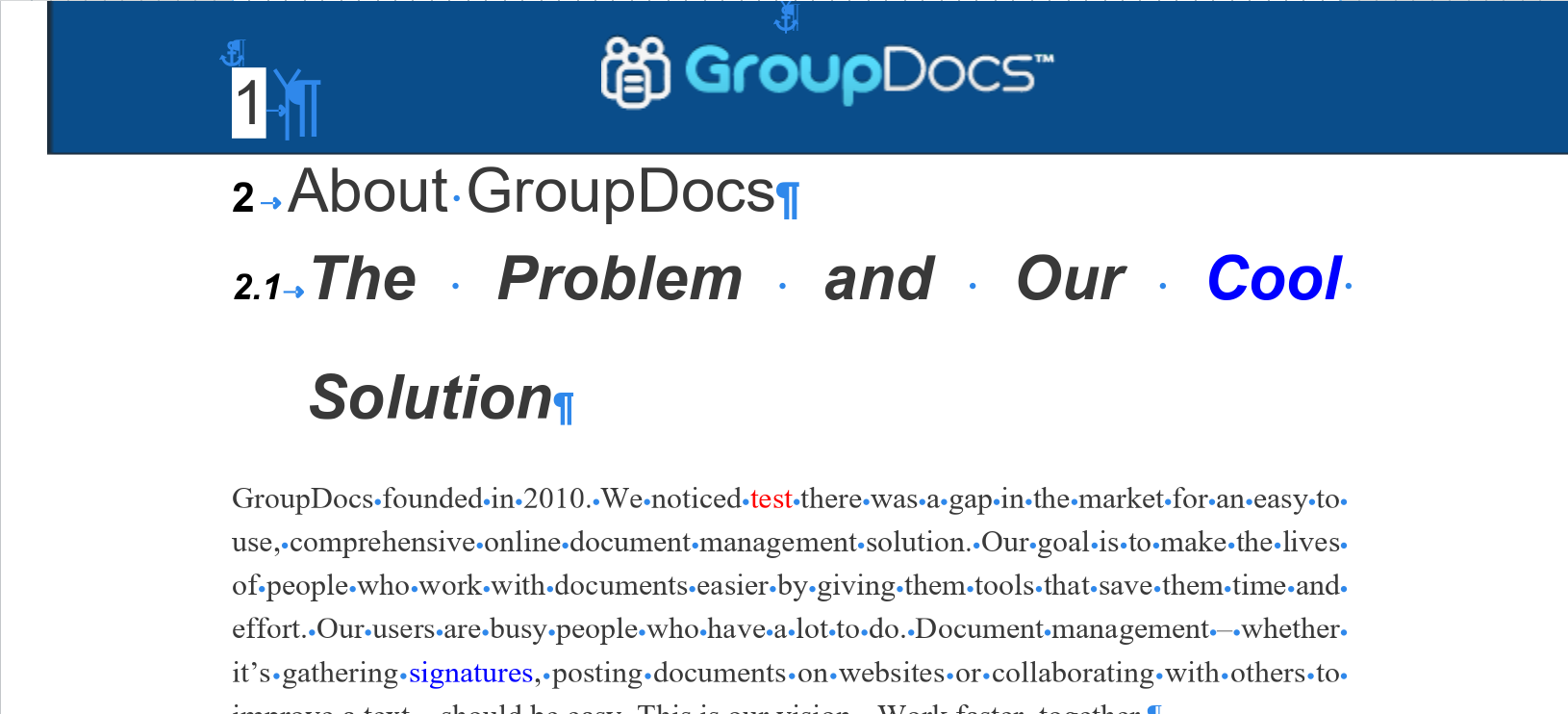
By default, GroupDocs.Comparison highlights detected changes with the following colours:
* Inserted – **blue**
* Deleted – **red**
* Style changed – **green**
These are the defaults — you can override colours, fonts, and other styling via the `InsertedItemStyle`, `DeletedItemStyle`, and `ChangedItemStyle` properties. See [Customize changes styles]({{< ref "/comparison/java/advanced-usage/comparison/customize-changes-styles.md" >}}) for details.
## Basic comparison workflow
To compare two documents, follow these steps:
1. Instantiate the [Comparer](https://reference.groupdocs.com/comparison/java/com.groupdocs.comparison/comparer) object with source document path or stream.
2. Call the [add()](https://reference.groupdocs.com/comparison/java/com.groupdocs.comparison/comparer/#add-java.lang.String-) method and specify target document path or stream.
3. Call the [compare()](https://reference.groupdocs.com/comparison/java/com.groupdocs.comparison/comparer/#compare-java.lang.String-) method. It returns the path of the result document.
### Compare local documents
{{< tabs "example1">}}
{{< tab "Java" >}}
```java
import com.groupdocs.comparison.Comparer;
import java.nio.file.Path;
// ...
try (Comparer comparer = new Comparer("source.pdf")) {
comparer.add("target.pdf");
final Path resultPath = comparer.compare("result.pdf");
}
```
{{< /tab >}}
{{< /tabs >}}
The output file is as follows:
### Compare documents from stream
{{< tabs "example2">}}
{{< tab "Java" >}}
```java
import com.groupdocs.comparison.Comparer;
import java.io.FileInputStream;
import java.io.FileOutputStream;
import java.io.InputStream;
import java.io.OutputStream;
// ...
try (InputStream sourceInputStream = new FileInputStream("source.docx");
InputStream targetInputStream = new FileInputStream("target.docx");
OutputStream resultOutputStream = new FileOutputStream("result.docx");
Comparer comparer = new Comparer(sourceInputStream)) {
comparer.add(targetInputStream);
comparer.compare(resultOutputStream);
}
```
{{< /tab >}}
{{< /tabs >}}
## Customize comparison with options
To control how the comparison is performed and how the result is rendered, pass a [CompareOptions](https://reference.groupdocs.com/comparison/java/com.groupdocs.comparison.options/compareoptions) object to the `compare()` method. These options work with any supported document format:
{{< tabs "example-options">}}
{{< tab "Java" >}}
```java
import com.groupdocs.comparison.Comparer;
import com.groupdocs.comparison.options.CompareOptions;
// ...
try (Comparer comparer = new Comparer("source.docx")) {
comparer.add("target.docx");
CompareOptions options = new CompareOptions();
options.setDetectStyleChanges(true);
options.setGenerateSummaryPage(true);
options.setShowDeletedContent(true);
options.setShowInsertedContent(true);
comparer.compare("result.docx", options);
}
```
{{< /tab >}}
{{< /tabs >}}
For format-specific behaviour, GroupDocs.Comparison provides dedicated subclasses of `CompareOptions`:
- [WordCompareOptions](https://reference.groupdocs.com/comparison/java/com.groupdocs.comparison.options/wordcompareoptions/) — Word-specific settings such as `DisplayMode` (REVISIONS / HIGHLIGHT), line-break marking, and bookmark comparison. See [Word document comparison options]({{< ref "/comparison/java/advanced-usage/comparison/word-compare-options.md" >}}).
- [PdfCompareOptions](https://reference.groupdocs.com/comparison/java/com.groupdocs.comparison.options/pdfcompareoptions/) — PDF-specific settings such as `DisplayMode` (INLINE / SIDE_BY_SIDE / INTERLEAVED), page-range filtering, image comparison, and PDF annotation author name. See [Disable image comparison in PDF documents]({{< ref "/comparison/java/advanced-usage/comparison/disable-image-comparison-in-pdf-documents.md" >}}).
Using a format-specific subclass is recommended when comparing a known document type — it makes Word-only or PDF-only settings discoverable and prevents you from passing irrelevant options.
The example below compares only the first two pages of two PDF documents and lays the result out side by side:
{{< tabs "example-pdf">}}
{{< tab "Java" >}}
```java
import com.groupdocs.comparison.Comparer;
import com.groupdocs.comparison.options.PagesSetup;
import com.groupdocs.comparison.options.PdfCompareOptions;
// ...
try (Comparer comparer = new Comparer("source.pdf")) {
comparer.add("target.pdf");
PagesSetup pagesSetup = new PagesSetup();
pagesSetup.setStartPage(1); // 1-based, inclusive; null means "from the first page"
pagesSetup.setEndPage(2); // 1-based, inclusive; null means "to the last page"
PdfCompareOptions options = new PdfCompareOptions();
options.setDisplayMode(PdfCompareOptions.ComparisonDisplayMode.SIDE_BY_SIDE);
options.setPagesSetup(pagesSetup);
comparer.compare("result.pdf", options);
}
```
{{< /tab >}}
{{< /tabs >}}
## Configure loading with LoadOptions
While `CompareOptions` controls how documents are compared, [LoadOptions](https://reference.groupdocs.com/comparison/java/com.groupdocs.comparison.options.load/loadoptions/) controls how the source and target files are loaded into the `Comparer`. It is passed to the `Comparer` constructor and to `add()`, before any comparison runs.
{{< tabs "example-loadoptions">}}
{{< tab "Java" >}}
```java
import com.groupdocs.comparison.Comparer;
import com.groupdocs.comparison.options.load.LoadOptions;
import com.groupdocs.comparison.result.FileType;
// ...
LoadOptions loadOptions = new LoadOptions();
loadOptions.setFileType(FileType.DOCX);
try (Comparer comparer = new Comparer("source.docx", loadOptions)) {
comparer.add("target.docx", loadOptions);
comparer.compare("result.docx");
}
```
{{< /tab >}}
{{< /tabs >}}
Common `LoadOptions` properties:
- `Password` — open a password-protected source or target document. See [Load password-protected documents]({{< ref "/comparison/java/advanced-usage/loading/load-password-protected-documents.md" >}}).
- `FileType` — specify the document format explicitly and skip auto-detection (faster for large files). See [Specify file type for comparison manually]({{< ref "/comparison/java/advanced-usage/loading/specify-file-type-manually.md" >}}).
- `FontDirectories` — provide custom font directories used while rendering the result. See [Load custom fonts]({{< ref "/comparison/java/advanced-usage/loading/load-custom-fonts.md" >}}).
- `SkipExternalResources` / `WhitelistedResources` — control whether remote images and other external resources referenced by a document are loaded (skipped by default). See [Three Ways to Handle External Resources]({{< ref "/comparison/java/use-cases/configuring external resource loading/configuring-external-resource-loading.md" >}}).
## Next steps
Once the basic comparison works, common follow-up tasks include:
- [Customize changes styles]({{< ref "/comparison/java/advanced-usage/comparison/customize-changes-styles.md" >}}) — change highlight colours, fonts, and formatting.
- [Adjusting comparison sensitivity]({{< ref "/comparison/java/advanced-usage/comparison/adjusting-comparison-sensitivity.md" >}}) — tune how granular the comparison should be.
- [Get list of changes]({{< ref "/comparison/java/advanced-usage/comparison/get-list-of-changes.md" >}}) — retrieve detected differences as a structured collection.
- [Work with the comparison result]({{< ref "/comparison/java/comparison-basic/how-to-get-result-document-object.md" >}}) — use the returned result path and open the result with other libraries.
- [Accept or reject detected changes]({{< ref "/comparison/java/advanced-usage/comparison/accept-or-reject-detected-changes.md" >}}) — apply changes selectively.
- [Compare multiple documents]({{< ref "/comparison/java/advanced-usage/comparison/compare-multiple-documents/_index.md" >}}) — compare more than two files in a single pass.
- [Load password-protected documents]({{< ref "/comparison/java/advanced-usage/loading/load-password-protected-documents.md" >}}) — provide passwords for protected source or target files.